
hack the box tier0 Redeemer
HTB WP -Redeemer
task1:
1 | Which TCP port is open on the machine? |
开扫:
1 | nmap -sV 10.129.91.201 |

可惜这1000个端口没扫到(这里不是网络问题,既然能扫1000个端口说明已经连上了)
那就只能扩大端口范围了:
1 | nmap -p- 10.129.91.201 |
其中:
-p-:表示扫描全部 TCP 端口,也就是 1-65535,等价于 -p1-65535。
但是效果很慢。

可以尝试等,或者换种更快的。
决定换一个:
1 | nmap -Pn -sS -T4 --min-rate 100 -p- 10.129.91.207 |
1 | 其中: |
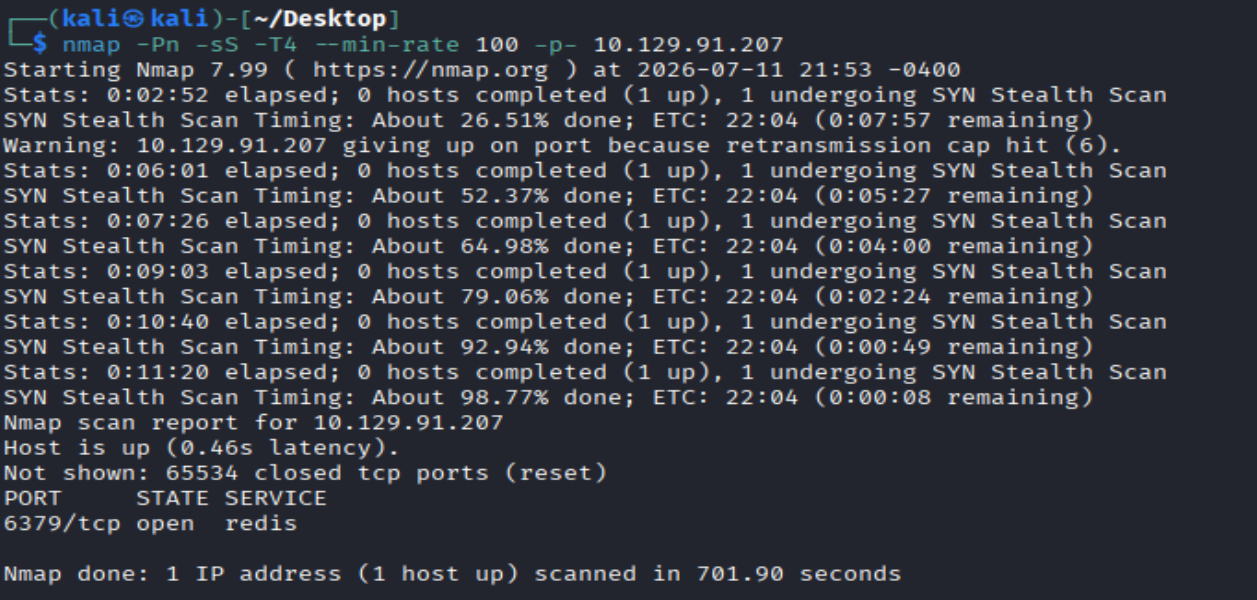
发包频率尽量小点,不然给容器扫炸了。
得到端口6379:
1 | PORT STATE SERVICE |
task2:
1 | Which service is running on the port that is open on the machine? |
回答:
就是上面扫出来那个
1 | redis |
task3:
1 | What type of database is Redis? Choose from the following options: (i) In-memory Database, (ii) Traditional Database |
回答:
1 | In-memory Database |
task4:
1 | Which command-line utility is used to interact with the Redis server? Enter the program name you would enter into the terminal without any arguments. |
回答:
1 | redis-cli |
task5:
1 | Which flag is used with the Redis command-line utility to specify the hostname? |
回答:
1 | -h |
task6:
1 | Once connected to a Redis server, which command is used to obtain the information and statistics about the Redis server? |
回答:
1 | info |
task7:
1 | What is the version of the Redis server being used on the target machine? |
回答:
根据之前的端口,用-sV 确定版本
1 | nmap -Pn -sV -p6379 10.129.91.207 |
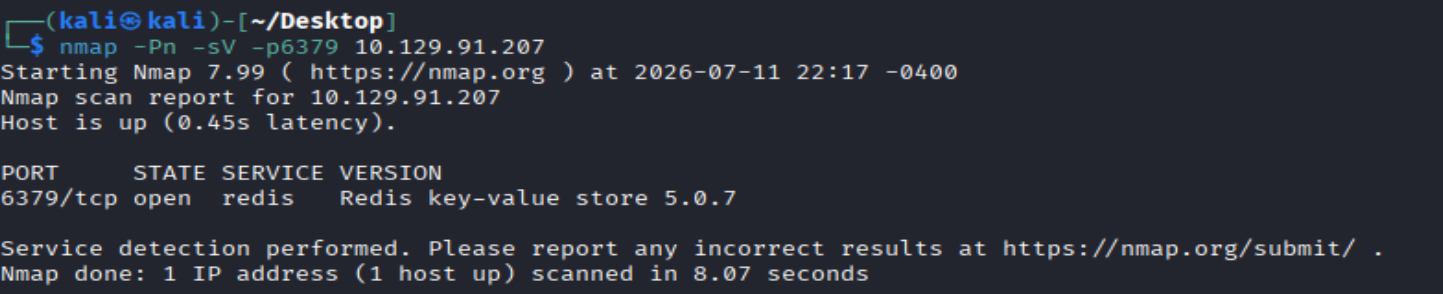
得到版本:
1 | Redis key-value store 5.0.7 |
或者可以连那个服务再确定版本(为后面获得flag做铺垫):
1 | redis-cli -h 10.129.91.207 -p 6379 |

输入info看信息:
1 | 10.129.91.207:6379> info |
可以看到:
1 | redis_version:5.0.7 |
或者直接输入:
1 | info server |
得到:
1 | 10.129.91.207:6379> info server |
task8:
1 | Which command is used to select the desired database in Redis? |
回答:
1 | select |
和SQl数据库的选择命令一样
task9:
1 | How many keys are present inside the database with index 0? |
回答:
前面info里有
1 | # Keyspace |
键就是keyspace,所以有4个
或者直接输入:
1 | info keyspace |
得到:
1 | 10.129.91.207:6379> info keyspace |
或者输入:
1 | select 0 |

切换至 0 号库(但其实默认连接索引为 0 的数据库):
1 | dbsize |

task10:
1 | Which command is used to obtain all the keys in a database? |
回答:
1 | keys * |
task11:
1 | Submit root flag |
回答:
先连到服务:
1 | redis-cli -h 10.129.91.207 -p 6379 |
这个命令里没有ls,而redis是数据库,所以依照ls的思想,把这个数据库里的所有键列出来:
1 | keys * |
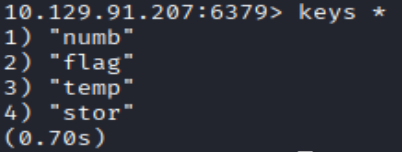
看到flag键了,先用 type 命令确定 flag 的类型:
1 | type flag |

接着直接用 get 命令获取指定键(Key)的字符串(String)值。:
1 | get flag |
得到flag:

这些命令啥的多积累,要用的时候拿出来看即可
本博客所有文章除特别声明外,均采用 CC BY-NC-SA 4.0 许可协议。转载请注明来源 joke的小世界!
相关推荐
2026-08-15
hack the box tier0 Fawn
HTB WP -Fawntask1:12What does the 3-letter acronym FTP stand for?FTP这三个字母的缩写代表什么? 回答: 12File Transfer Protocol文件传输协议,是一种用于在网络上传输文件的协议。 task2:12Which port does the FTP service listen on usually?FTP 服务通常监听哪个端口? 回答: 121 task3:12FTP sends data in the clear, without any encryption. What acronym is used for a later protocol designed to provide similar functionality to FTP but securely, as an extension of the SSH protocol?FTP以明文形式发送数据,不进行任何加密。后来出现了一种协议,旨在提供与FTP类似的功能,但更加安全,它是SSH协议的扩展,该协议的缩写是什么? ...
2026-08-15
hack the box tier2 Oopsie
HTB WP -Oopsietask1:12With what kind of tool can intercept web traffic?拦截网络流量通常使用什么类型的工具? 回答: 12proxy(代理)你可以通过网络代理,将你的流量重定向到代理服务器。 task2:12What is the path to the directory on the webserver that returns a login page?返回登录页面的网页服务器目录路径是什么? 先对容器进行初步探测,nmap扫一下: 1nmap -F 10.129.137.140 开了个http端口,浏览器访问一下: 找一下登录页面。这里要用到bp抓包(task1就提示了代理,代理对应着抓包),因为我的bp在kali上是社区版(最新版还没有破解版),所以这次我用了win环境来做(仅限抓包)。(win环境下我有bp专业版),先bp抓一下包: 然后我们在目标的配置文件里找到了Login的路径(login的js脚本): 1/cdn-cgi/login task3:12What can...
2026-08-15
hack the box tier2 Vaccine
HTB WP -Vaccinetask1:12Besides SSH and HTTP, what other service is hosted on this box?除了 SSH 和 HTTP 之外,这台机器上还托管了什么其他服务? 快速用nmap扫一下: 1nmap -F 10.129.124.138 可以看到还有个ftp服务,答案是: 1ftp (新开了一个靶机做补充知识)这是全面扫描的一个指令: 1sudo nmap -sS -sVC -Pn -T4 --open -vv (your ip) -oA fulltcpscan 参数意思: 12345678-sS:隐蔽扫描或者SIN扫描。-sVC:就是-sV和-sC的结合,用于版本扫描和用部分脚本去扫。-Pn:跳过主机发现阶段,人话就是跳过ping,不需要去确定它在网络上是否存活。-T4:就是tier 4,描述的是扫描的强度,激进模式,扫描速度也很快。--open:只报告开放端口。-vv:获得更详细的输出。-oA:给出输出模版,A就是all的意思,给出完整信息。fulltcpscan:只是给输出的东西命名罢了不...
2026-08-15
hack the box tier1 Appointment
HTB WP -Appointmenttask1:12What does the acronym SQL stand for?SQL 这个缩写代表什么意思? 回答: 1Structured Query Language task2:12What is one of the most common type of SQL vulnerabilities?最常见的 SQL 漏洞类型之一是什么? 回答: 1SQL Injection,就是SQL注入,攻击者通过在输入框中恶意输入 SQL 代码,来骗过数据库服务器,从而窃取、篡改数据,甚至直接控制整个系统。 task3:12What is the 2021 OWASP Top 10 classification for this vulnerability?这种漏洞在 2021 版 OWASP Top 10 中的分类是什么? 回答: 1A03:2021-Injection task4:12What does Nmap report as the service and version that are running on p...
2026-08-15
hack the box tier1 Crocodile
HTB WP -Crocodiletask1:12What Nmap scanning switch employs the use of default scripts during a scan?哪一个 Nmap 扫描参数(开关)在扫描期间会使用默认脚本? 回答: 1-sC 之前说过,它等同于 --script=default。在实际使用中,大家也经常把 -sC 和用于探测版本的 -sV 组合在一起,写作 -sCV task2:12What service version is found to be running on port 21?在 21 端口上发现了哪个正在运行的服务版本? 探测版本用-sV参数 1nmap -sV 10.129.98.248 -p 21 没有-p也是可以的,答案是: 1vsftpd 3.0.3 task3:12What FTP code is returned to us for the "Anonymous FTP login allowed" message?提示 “允许匿名 FTP 登录”(Anonymo...
2026-08-15
hack the box tier1 Responder
HTB WP -Respondertask1:12When visiting the web service using the IP address, what is the domain that we are being redirected to?当使用 IP 地址访问该 Web 服务时,我们被重定向到了哪个域名? 回答: 我们访问一下这个网站: 110.129.118.189 1unika.htb 就是被重定向到的域名。 task2:12Which scripting language is being used on the server to generate webpages?服务器上正在使用哪种脚本语言来生成网页? nmap扫一下: 12nmap -sV 10.129.118.189或者nmap -p- --min-rate 1000 -sV 10.129.118.189 12345675985 端口(WinRM 服务)Windows 远程管理(WinRM) 是 Windows 的原生远程管理协议,它基于简单对象访问协议(SOAP)与远程计算机...
评论